Introduction
In the last chapter, we saw how an HTTP connection is upgraded to a WebSocket connection using the WebSocket handshake.
In this chapter, we will understand the WebSocket frame format and how to parse it.
What we will cover here
- WebSocket frame format
- How to parse a WebSocket frame
- How to send and receive messages in real-time
- I have only covered how to parse text data.
Visualizing WebSocket Frames
I built a WebSocket Frame Visualiser that shows how frames are constructed at the byte level.
Using this tool, you can:
- Toggle FIN, opcode, and mask bits
- Experiment with payload lengths
- See how extended payload lengths work
- Build intuition for how frames look on the wire
Understanding the WebSocket Frame Structure
- Frame size: 2 bytes are one frame
- Payload length
- If 7 bits result in <= 125, then it is the payload length
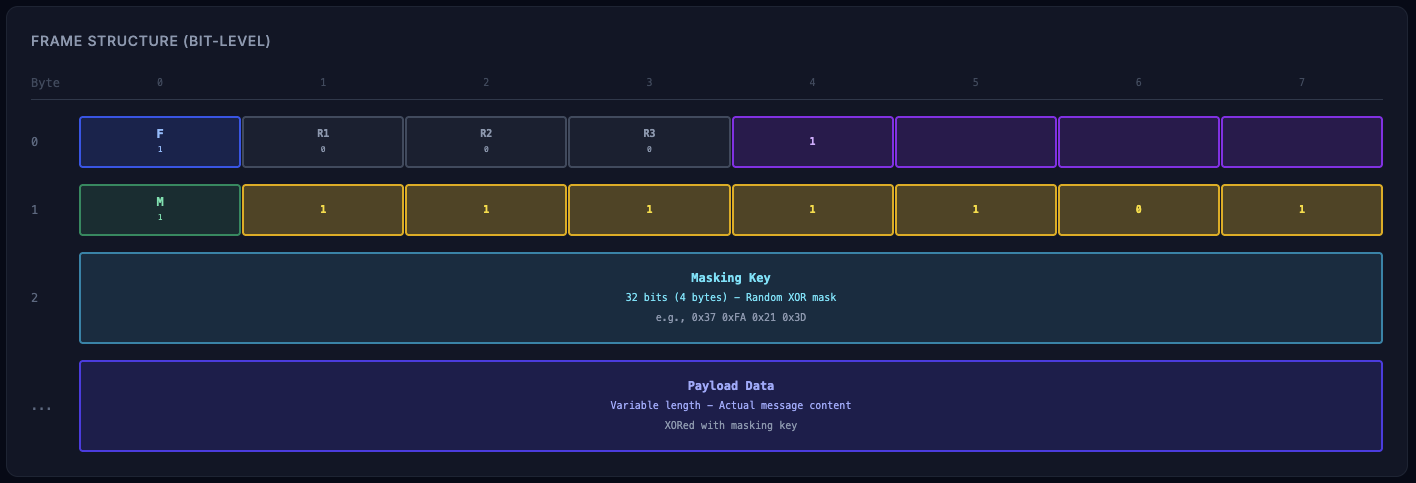
- If 7 bits result in 126, then need to read next 2 bytes to get the payload length
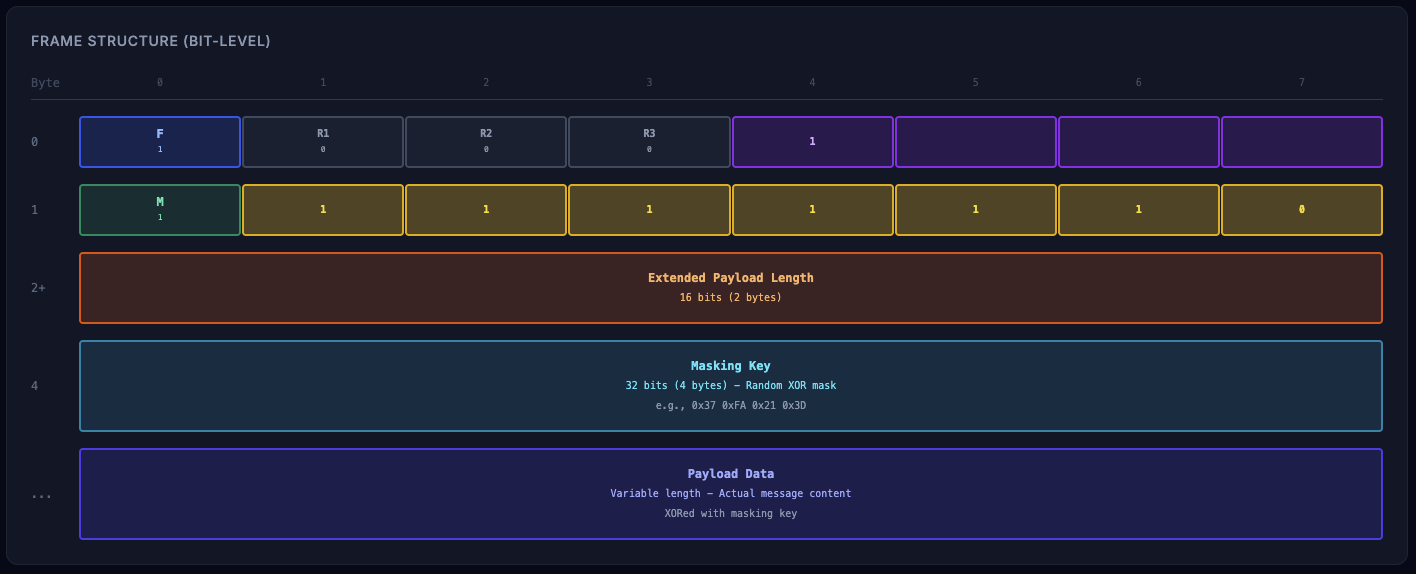
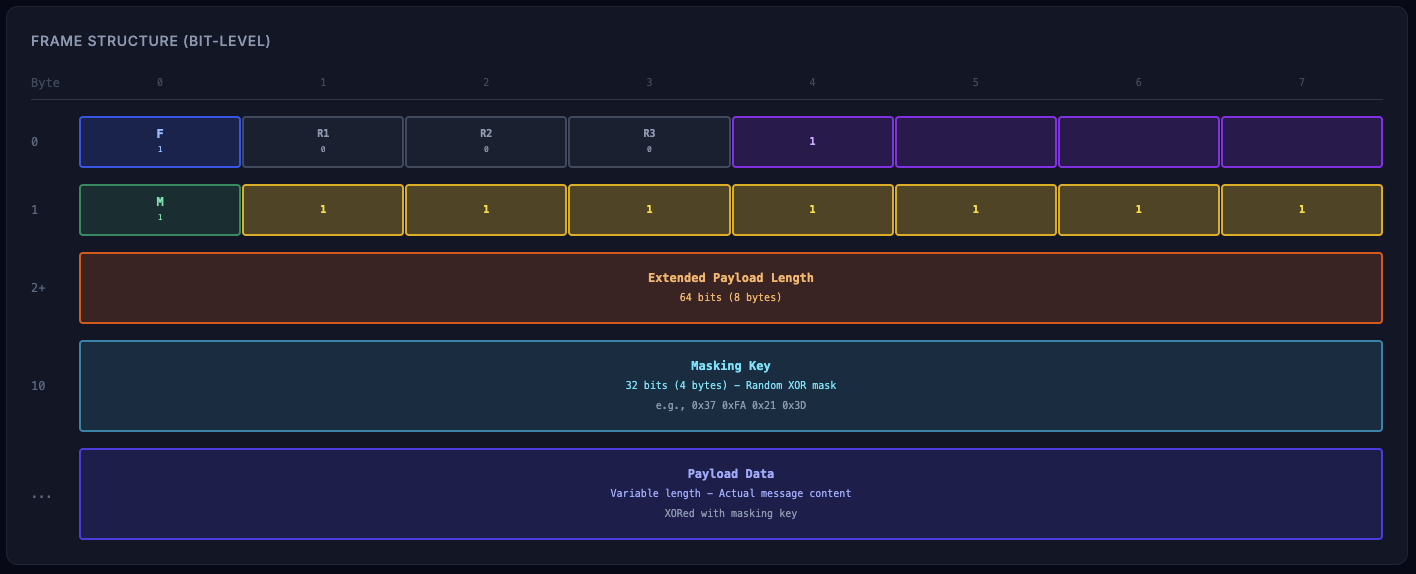
- If 7 bits result in 127, then need to read next 8 bytes to get the payload length. In this example we are not covering this case.
- If 7 bits result in <= 125, then it is the payload length
- Fin bit (0th bit)
- If 1, then it is the last frame
- If 0, then it is not the last frame
- Reserved bits (1st, 2nd and 3rd bit)
- 1: reserved
- 0: not reserved
- Opcode (4 bits)
- 0: continuation frame
- 1: text frame
- 2: binary frame
- 3: close frame
- 4: ping frame
- 5: pong frame
- Mask bit (7th bit): Indicates if payload is masked.
- 1 = masked (required for client-to-server)
- 0 = not masked (server-to-client)
How to parse a WebSocket frame
A WebSocket connection is a byte stream, not a message stream. Data can arrive in partial chunks, full frames, or multiple frames together.
Because of this, frame parsing always happens in stages.
Full code: https://github.com/Saurabh-kayasth/websocket-from-scratch/blob/master/src/WebSocketFrameParser.ts
1. Reading the Base Header
The parser first waits until at least 2 bytes are available. These two bytes decide how the rest of the frame should be interpreted.
const fin = (byte1 & 0x80) !== 0;
const opcode = byte1 & 0x0f;
const masked = (byte2 & 0x80) !== 0;
const payloadLength = byte2 & 0x7f;
At this point, we know:
- Whether the frame is final
- What type of frame it is
- Whether masking is applied
- How payload length should be resolved
2. Resolving the Actual Payload Length
The 7-bit payload length field can either be:
- The actual payload size
- Or a signal that the real size is stored next
if (payloadLength === 126) {
  actualLength = buffer.readUInt16BE(offset);
}
This design keeps small messages efficient while still supporting large payloads.
3. Reading the Masking Key
For client-to-server frames, masking is mandatory.
If the mask bit is set, the next 4 bytes are read as the masking key.
const maskKey = buffer.subarray(offset, offset + 4);
4. Extracting and Unmasking the Payload
Once the payload length is known, the payload bytes are read.
If the frame is masked, each byte is unmasked using XOR.
payload[i] = payload[i] ^ maskKey[i % 4];
After this step, the payload represents the original application data.
5. Handling the Parsed Frame
Once decoded, frames are handled based on their opcode:
- Text and binary frames → application data
- Ping frames → must be answered with pong
- Close frames → connection shutdown
Control frames are handled immediately and are not part of the application layer.
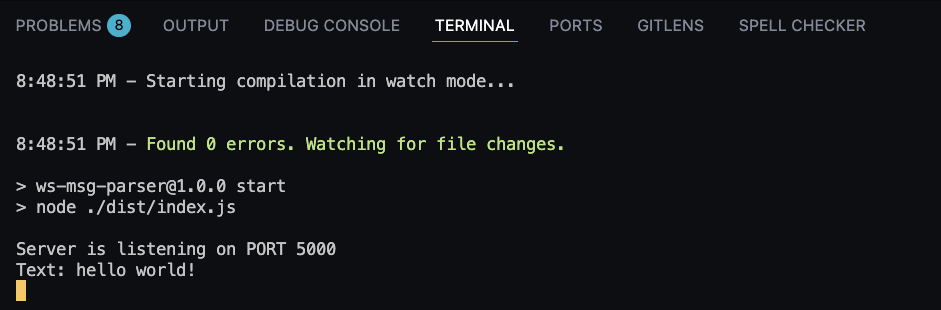
6. See It in Action
- Open the browser console and run the following code:
const ws = new WebSocket('ws://localhost:5000');
- Observe the console output to see the parsed frames.
Summary
In this chapter, we have seen how to parse a WebSocket frame and understand the frame format.
We have also seen how to send and receive messages in real-time.