Managing the Thundering Herd
The thundering herd problem happens when a specific event, like a cache expiration, triggers many requests for the same resource at once. In a Node.js app, this creates a sudden surge of tasks for the event loop. This surge can lead to high memory use and database failure.
Note
I use Node.js and TypeScript for the examples in this blog. However, the system design ideas work for any language. You can use the same logic in Go, Python, or Java.
To build a stable system, we must manage how our app uses resources under heavy load. We can do this with three layers of defense.
Layer 1: Admission Control with Token Buckets
Admission control is the first gate for any request. It ensures that the number of active tasks does not exceed what the CPU and memory can handle. We can use a token bucket to enforce a rate limit.
The app keeps a bucket of tokens that refills at a steady rate. Every request must take one token to proceed. if the bucket is empty, the app returns a 429 Too Many Requests status. This prevents the event loop from getting overwhelmed before the request even reaches the database logic.
Layer 2: Database Connection Pooling
Database connections are limited. If thousands of requests try to open a connection at the same time, the database will run out of slots.
A connection pool limits the maximum number of active queries. If the pool is full, new queries must wait for an existing one to finish. This ensures the database stays healthy and does not crash during a traffic spike.
Layer 3: Request Collapsing (Promise Caching)
When multiple requests ask for the exact same data, it is inefficient to run the same query many times. We can use request collapsing to solve this.
In Node.js, we can store the Promise of a database query in a map.
- The first request starts the query and saves the promise.
- Any other request for the same data finds the promise in the map and waits for it.
- When the query finishes, all requests get the result at the same time using only one database connection.
Technical Implementation
To understand the fix, we should first look at a vulnerable server. This server performs a database query for every single request it receives.
The Vulnerable Server
import express from 'express';
import type { Request, Response } from 'express';

const app = express();
const port = 3000;

let dbHits = 0;
let requestCount = 0;

const fetchFromDatabase = (id: string): Promise<any> => {
  return new Promise((resolve) => {
    setTimeout(() => {
      dbHits++;
      resolve({ id, payload: "Expensive Database Result", timestamp: Date.now() });
    }, 500);
  });
};

app.get('/vulnerable/:id', async (req: Request, res: Response) => {
  requestCount++;
  const resourceId = req.params.id as string;
  try {
    const data = await fetchFromDatabase(resourceId);
    res.json(data);
  } catch (error) {
    res.status(500).send("Database Error");
  }
});

app.get('/stats', (_req: Request, res: Response) => {
  res.json({ incomingRequests: requestCount, databaseQueries: dbHits });
});

app.listen(port);
The Fixed Server
The fixed server uses an integrated approach with three layers of protection. It uses a Token Bucket for admission control, a Database Pool for connection safety, and Request Collapsing to reuse active queries.
import express from 'express';
import type { Request, Response } from 'express';

const app = express();

// 1. Admission Control (Token Bucket)
class TokenBucket {
  private tokens: number;
  private lastRefill: number;

  constructor(private capacity: number, private refillRate: number) {
    this.tokens = capacity;
    this.lastRefill = Date.now();
  }

  public tryConsume(): boolean {
    const now = Date.now();
    const gained = ((now - this.lastRefill) / 1000) * this.refillRate;
    this.tokens = Math.min(this.capacity, this.tokens + gained);
    this.lastRefill = now;

    if (this.tokens >= 1) {
      this.tokens -= 1;
      return true;
    }
    return false;
  }
}

// 2. Database Connection Pool
class DatabasePool {
  private activeConnections = 0;
  constructor(private maxConnections: number) {}

  async acquireAndExecute<T>(queryFn: () => Promise<T>): Promise<T> {
    if (this.activeConnections >= this.maxConnections) {
      throw new Error("503: Database Busy");
    }
    this.activeConnections++;
    try {
      return await queryFn();
    } finally {
      this.activeConnections--;
    }
  }
}

const admissionControl = new TokenBucket(100, 50);
const dbPool = new DatabasePool(10);
const inFlightPromises = new Map<string, Promise<any>>();

app.get('/data/:resourceId', async (req: Request, res: Response) => {
  const { resourceId } = req.params;

  // STEP 1: Admission Control
  if (!admissionControl.tryConsume()) {
    return res.status(429).json({ error: "Rate limit exceeded" });
  }

  // STEP 2: Request Collapsing
  if (inFlightPromises.has(resourceId)) {
    return res.json(await inFlightPromises.get(resourceId));
  }

  // STEP 3: Execute through Pool
  const fetchTask = dbPool.acquireAndExecute(async () => {
    // Artificial 500ms Database Latency
    return new Promise(res => setTimeout(() => res({ id: resourceId, data: "Success" }), 500));
  }).finally(() => {
    inFlightPromises.delete(resourceId);
  });

  inFlightPromises.set(resourceId, fetchTask);

  try {
    const result = await fetchTask;
    res.json(result);
  } catch (err: any) {
    res.status(503).json({ error: err.message });
  }
});

app.listen(3000);
Why do we still need a Token Bucket?
You might think that request collapsing is enough because it prevents the same query from running twice. However, consider a scenario where 2,000 unique users (like user1, user2, up to user2000) all hit your server at the exact same time.
In this case, every request is asking for different data. This means Request Collapsing will not work because there are no matching promises to reuse.
If you do not have a Token Bucket, all 2,000 requests will enter your Node.js process. This can lead to two major problems:
- Memory Exhaustion: Thousands of request objects can fill up the Node.js memory (heap), causing a crash.
- Resource Pressure: The event loop can get slow just trying to manage thousands of active connections.
The Token Bucket is your “Admission Control.” It ensures that your server only accepts the amount of traffic it can safely handle. If 2,000 unique users arrive but your bucket only has 100 tokens, 1,900 of them will be stopped at the “front door” with a 429 status. This keeps your server stable even when caching cannot help.
Performance Results
We can use Autocannon to compare these two servers. Initially, we sent 2,000 requests to each server. Then, we tested the fixed server with a massive surge of 115,000 requests to see how it handles a real “herd.”
Testing the Vulnerable Server
The vulnerable server tried to run a database query for every single request.
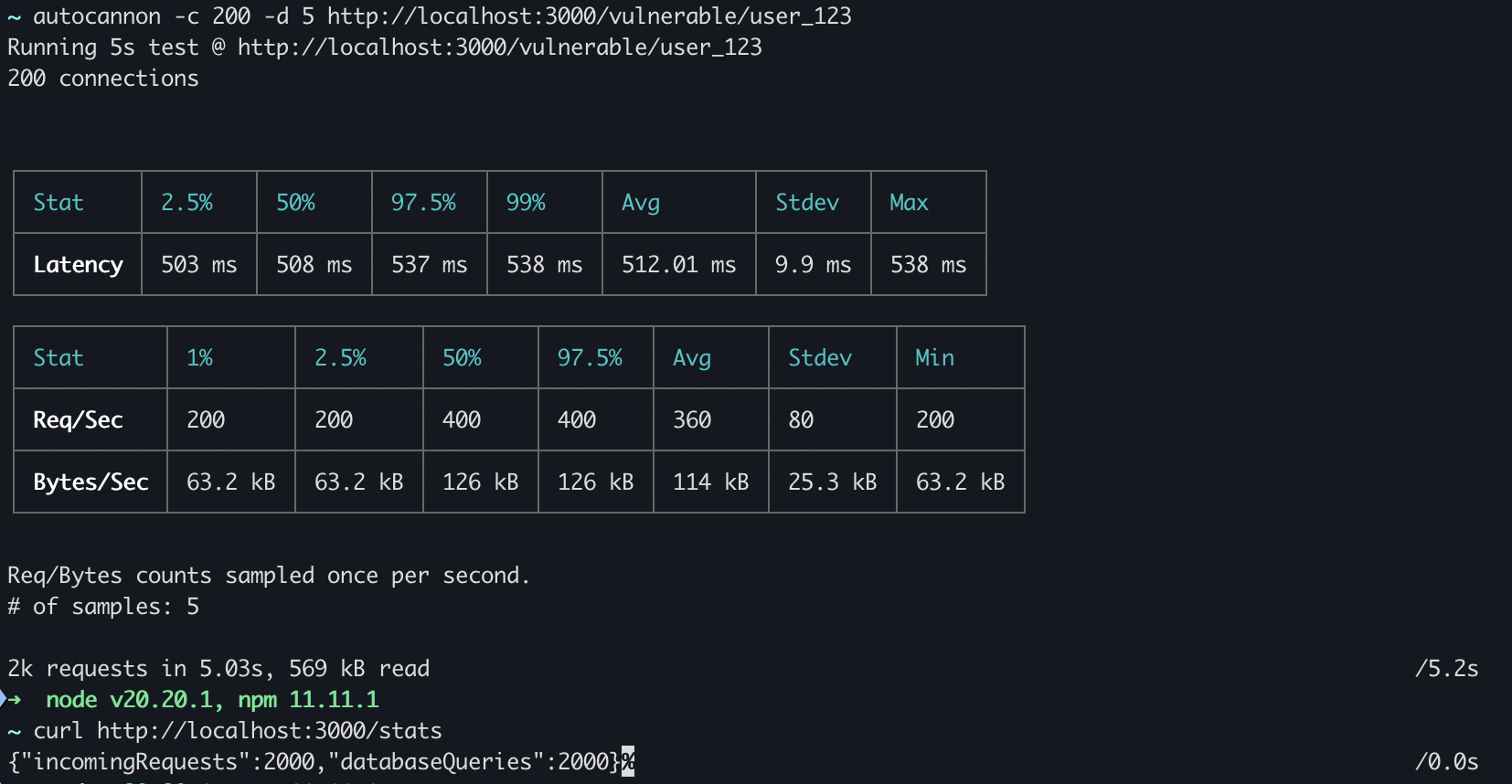
- Average Latency: 512 ms
- Total Requests: 2,000
- Database Queries: 2,000
Testing the Fixed Server (The Integrated Approach)
The fixed server used all three layers of defense. Even when we attacked it with 115,000 requests, it stayed stable.
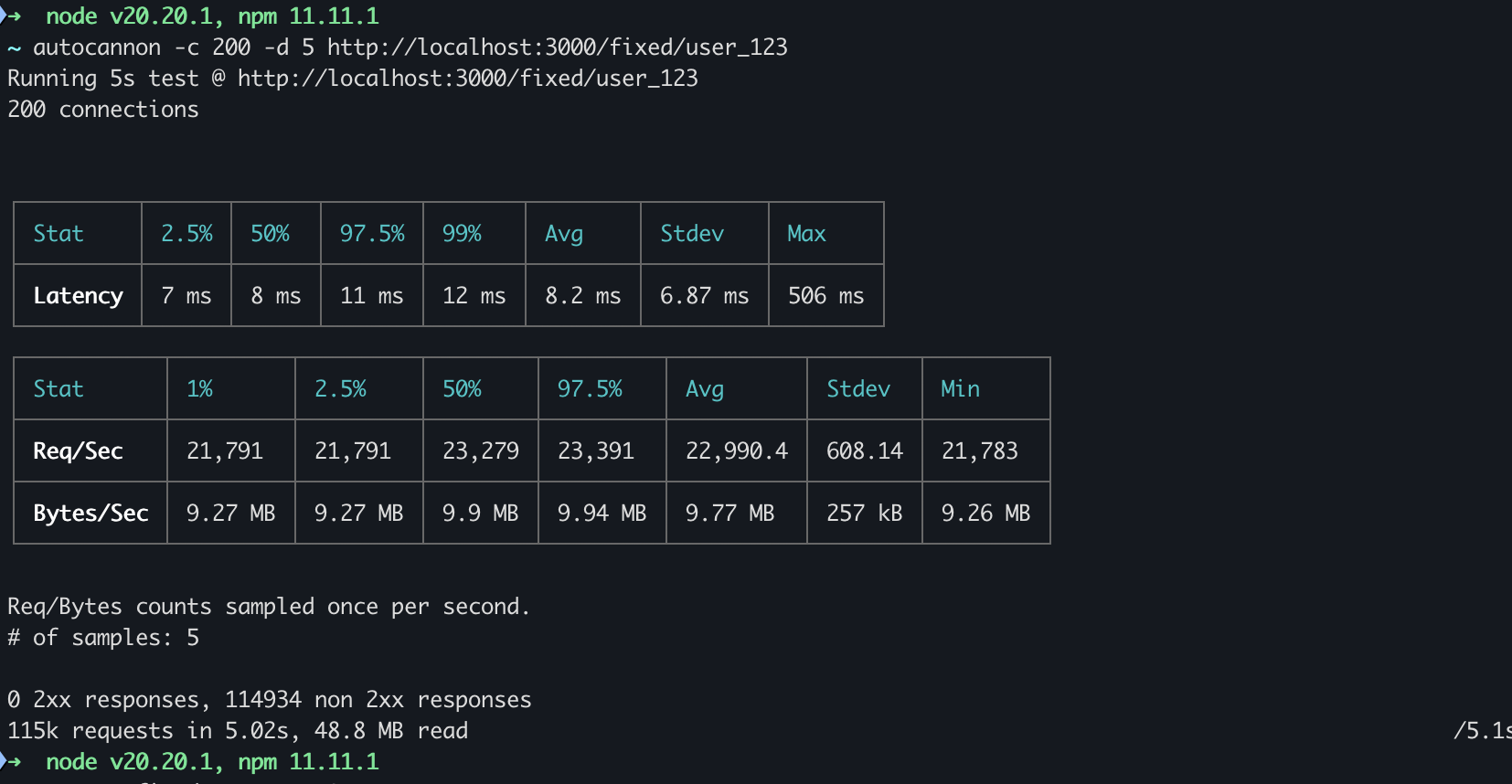
- Average Latency: 8.2 ms
- Total Requests: 115,000
- Blocked Requests (non-2xx): ~114,000
Why is the latency so low (8.2ms)?
You might notice that the latency dropped from 512ms to 8.2ms. This is because the Token Bucket (Layer 1) rejected most of the requests at the front door. Since those requests did not have to wait for the 500ms database query, they were resolved almost instantly with a “Too Many Requests” status.
Why are there so many non-2xx responses?
The 114,000 non-2xx responses show the Token Bucket in action. It blocked the majority of the “herd” to ensure the Node.js process and the database did not crash. Only a small, safe number of requests were allowed to proceed.
Why do we see very few database queries?
Even for the requests that passed the front door, Request Collapsing (Layer 3) ensured that only a few actual queries reached the database.
In our test, each database call takes 500ms. Over a 5 second test:
- Any request that arrives during the 500ms window will join the active promise.
- Once the 500ms window is over, the promise is removed from the map.
- The next request starts a new 500ms window.
This means even with 115,000 requests, the database only saw about 10 queries (one for every 500ms window).
Conclusion
Managing the thundering herd is about protecting your resource lifecycle.
- Token Buckets protect the Node.js process.
- Connection Pools protect the Database.
- Promise Caching ensures Efficiency.
Source code: https://github.com/Saurabh-kayasth/system-design-concepts/tree/main/02-caching/thundering-herd