I have been using an external monitor with my MacBook for a long time. One thing that always irritated me was moving the cursor and windows from one screen to another manually.
I wanted a way to move my cursor to the center of the alternate monitor or move my window using just a hotkey.
I came across a tool called Hammerspoon. It is a bridge between macOS and Lua scripting. I wrote a small script to bind hotkeys that move my cursor and windows. I often need two apps open at the same time, so I decided to add functions for resizing windows to the left and right halves too.
How to set it up:
- Download Hammerspoon and give it Accessibility permission in System Settings.
Privacy & Security -> Accessibility
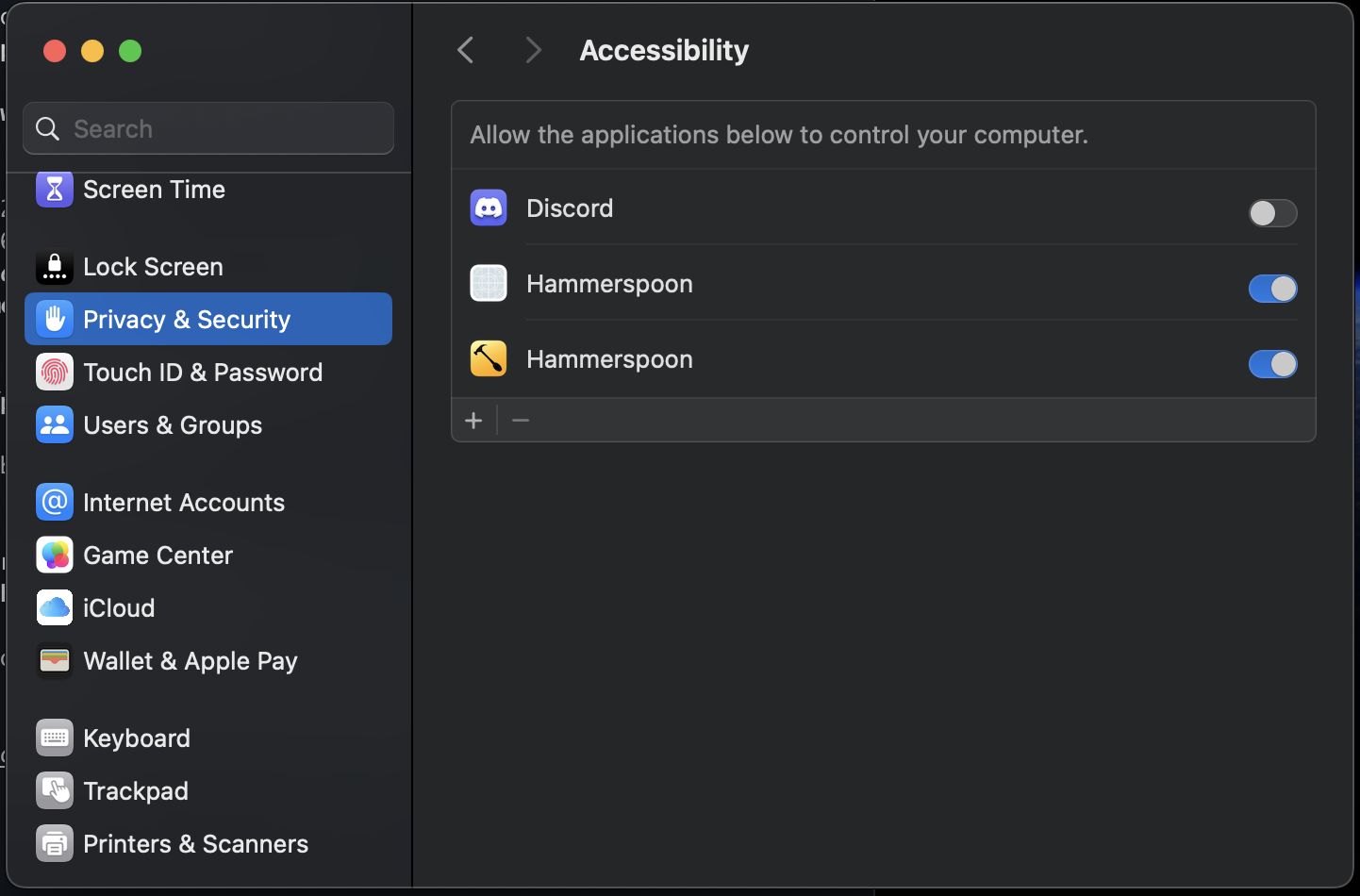
- You will see a hammer icon on the top right corner of your window. Click on Open Config and paste the script below into the init.lua file.
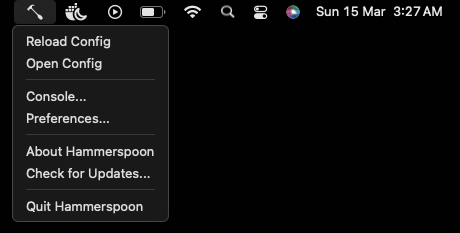
- Once the script is added, save it. Again, click on the hammer icon and click on Reload Config.
Full Script:
-- Move cursor to the center of the NEXT screen
hs.hotkey.bind({"cmd", "alt", "ctrl"}, "M", function()
    local screen = hs.mouse.getCurrentScreen()
    local nextScreen = screen:next()
    local rect = nextScreen:fullFrame()
    local center = {
        x = rect.x + (rect.w / 2),
        y = rect.y + (rect.h / 2)
    }
    hs.mouse.setAbsolutePosition(center)
end)

-- Move the focused window to the NEXT screen
hs.hotkey.bind({"cmd", "alt", "ctrl"}, "W", function()
    local win = hs.window.focusedWindow()
    if win then
        local screen = win:screen()
        local nextScreen = screen:next()
        win:moveToScreen(nextScreen, false, true, 0)
    else
        hs.alert.show("No active window found")
    end
end)

-- Move BOTH Window and Cursor to the next screen with one shortcut
hs.hotkey.bind({"cmd", "alt", "ctrl"}, "N", function()
    local win = hs.window.focusedWindow()
    if win then
        local screen = win:screen()
        local nextScreen = screen:next()
        win:moveToScreen(nextScreen, false, true, 0)
        local f = win:frame()
        local center = {
            x = f.x + (f.w / 2),
            y = f.y + (f.h / 2)
        }
        hs.mouse.setAbsolutePosition(center)
    else
        hs.alert.show("No active window found")
    end
end)

-- Move window to Left Half
hs.hotkey.bind({"cmd", "alt", "ctrl"}, "Left", function()
    local win = hs.window.focusedWindow()
    if win then
        win:moveToUnit(hs.layout.left50)
    end
end)

-- Move window to Right Half
hs.hotkey.bind({"cmd", "alt", "ctrl"}, "Right", function()
    local win = hs.window.focusedWindow()
    if win then
        win:moveToUnit(hs.layout.right50)
    end
end)
It was really cool to see it working. Although initially it felt slow, as I got used to using the hotkeys, it felt much faster.